Logout Guide
Want to log out of Axiomatic Online?
Logging out from your Axiomatic Online account is a simple process that helps ensure the security of your data. Navigate to the log out button following the steps below.
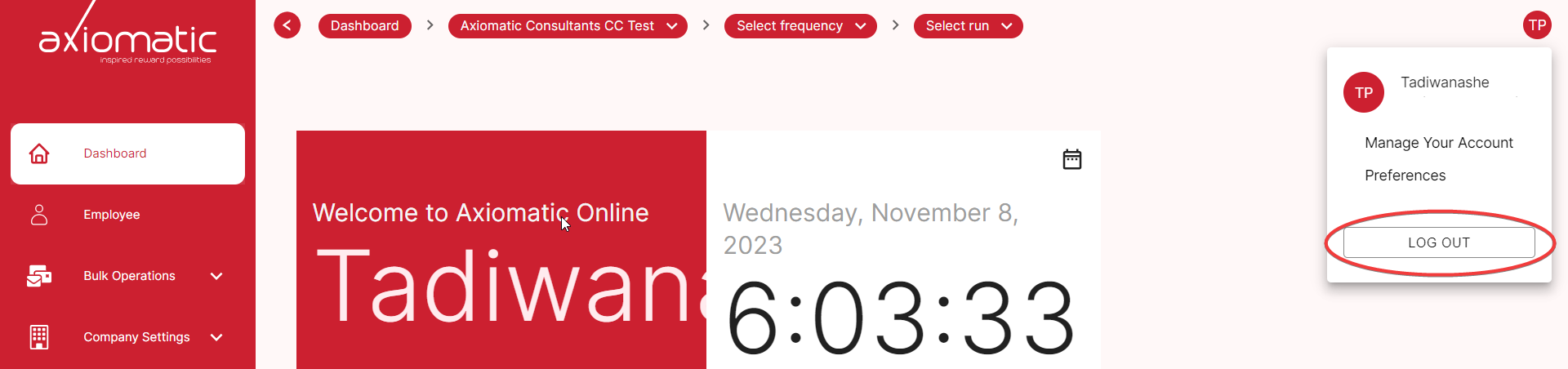
Steps to Log Out
-
In the Axiomatic Online dashboard, locate the user profile icon in the top-right corner of the screen. It may appear as a user avatar or a username.
-
Click on the user profile icon to reveal a dropdown menu.
-
In the dropdown menu, look for the “Log Out” option. When you click on it, it will automatically log you out of the platform.
Logging Out for Security
Logging out of your account is essential to protect your data and privacy, especially if you’re using a shared or public computer. Make it a practice to log out when you’re finished using Axiomatic Online.
Thank you for choosing Axiomatic Online!