Adding New Records
How to Add New Records
Adding new records in the Axiomatic Online Employee Tab is a straightforward process. You can easily create and insert new entries by following these simple steps:
Steps to Add a New Record
-
Locate the Add Icon (+): When you’re in the Employee Tab and want to add a new record, look for the “Add” icon (+) typically positioned at the top left side of the list of records.

-
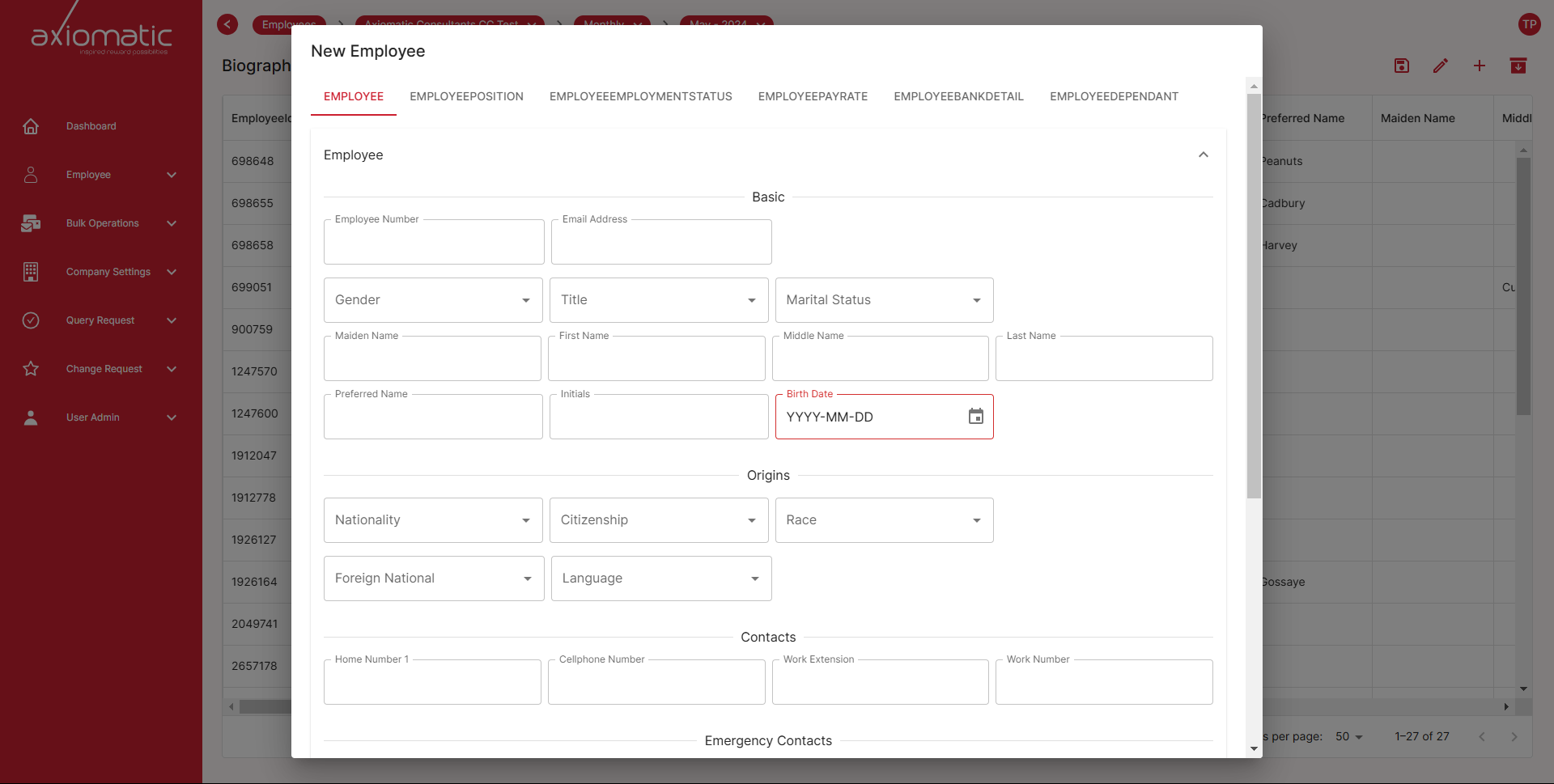
Click the Add Icon (+): Click on the “Add” icon (+) to initiate the process of adding a new record. This action will trigger a popup form where you can input the details for the new entry.
-
Populate the Fields: In the popup form, fill in the necessary fields with the required information. Ensure all mandatory fields are completed accurately.
-
Review Your Entry: Before finalizing, take a moment to review the details you’ve entered to ensure accuracy and completeness.
-
Save the New Record: After confirming that all necessary information is accurate and complete, click the “Save” button. This action will add the new record to the list of entries.
Summary
The “Add” icon (+) is your starting point for creating new records, and the “Save” button is your way of confirming and incorporating the new entry into your records. This user-friendly process allows you to efficiently expand your database with accurate and up-to-date information.